WHAT'S NEW?
A simple program to find out whether the String is palindrome or not without using StringBuffer class.
Let me break it in simple steps
int l=original.length();
String reverse="";
Whatever character you get in the reverse order,store it in reverse String
for(int i=l-1;i>=0;i--)
{
reverse=reverse+ original.charAt(i);
}
if(original.equals(reverse))
{
System.out.println("It is a palindrome");
}
else
{
System.out.println("It is not a palindrome");
}
Now let me put the whole code in one program.
class PalindromeWithoutSB
{
public static void main(String[] args)
{
String original="MALAYALAM";
int l=original.length();
String reverse="";
for (int i=l-1;i>=0 ;i-- )
{
reverse=reverse+original.charAt(i);
}
if(original.equals(reverse))
{
System.out.println("It is a palindrome");
}
else
{
System.out.println("It is not a palindrome");
}
}
}
Let me break it in simple steps
Step 1: Find the length of the original String using length().
String original="MALAYALAM";int l=original.length();
Step 2: Declare one more String to hold a reversed value.
String reverse="";
Step 3: Start a for loop in reverse order and make the use of method charAt();
In case you don't know the working of charAt() you can check it here. Click Me for charAt() post.Whatever character you get in the reverse order,store it in reverse String
for(int i=l-1;i>=0;i--)
{
reverse=reverse+ original.charAt(i);
}
Step 4: When the loop ends, you have two String where you can check whether they both match, if they match they are palindrome, else they are not.
if(original.equals(reverse))
{
System.out.println("It is a palindrome");
}
else
{
System.out.println("It is not a palindrome");
}
Now let me put the whole code in one program.
class PalindromeWithoutSB
{
public static void main(String[] args)
{
String original="MALAYALAM";
int l=original.length();
String reverse="";
for (int i=l-1;i>=0 ;i-- )
{
reverse=reverse+original.charAt(i);
}
if(original.equals(reverse))
{
System.out.println("It is a palindrome");
}
else
{
System.out.println("It is not a palindrome");
}
}
}
charAt() of String class is a simple method to find out the character at a particular position in the String.
Structure of charAt() looks like
public char charAt(int index)
- Returns the character at a particular index in the String
Lets say for String "Zartab", if i need to find what is the character at index number
So now to get any character at location let say 4, we need to write the code as
String str="Zartab";
char c=str.charAt(4);
System.out.println(c);
c will return 'A'.
The whole will look like
class CharAtDemo
{
public static void main(String[] args)
{
String str="ZARTAB";
char c=str.charAt(4);
System.out.println(c);
}
}
While working in projects it is one of the tricky task to convert the date from and to the various formats.
Especially for developers in India where date is majorly used in format DD-MM-YYYY face a difficulty of changing the date to and from the SQL format.
I am going to make the use of method split() of class String. In case you have never used the methods you can check the working here.
The actual code goes as follow
class DateWorker
{
public static String convert(String date)
{
String[] dateArray=date.split("-");
String convertedDate=dateArray[2]+"-"+dateArray[1]+"-"+dateArray[0];
return convertedDate;
}
}
public class ConvertDate
{
public static void main(String[] args)
{
String normalDate="23-05-2015";
String sqlDate=DateWorker.convert(normalDate);
System.out.println(sqlDate);
String normal=DateWorker.convert(sqlDate);
System.out.println(normal);
}
}
One method of DateWorker is enough for both the conversion as both the conversion are nothing but inversions.
Try the code and you will understand the rest.
Let say you have a string which reads "AX-001-2589".
If you want to break the String into array based in the separator i.e. in this case is a -.
String have a method by name split().
The structure of the methods looks something like this
public String[] split(String regex)
- The above method splits the String into an array containing all the elements separated by the given regex.
So coming back to example if we need to split the String into the array the program goes like
class SplitTheString
{
public static void main(String[] args)
{
String str="AX-001-2526";
String[] array=str.split("-");
for(int i=0;i<array.length;i++)
{
System.out.println(array[i]);
}
}
}
So the array holds data something like this
array[0]="AX";
array[1]="001";
array[2]="2526";
HTTP i.e. Hyper Text Transfer Protocol is a stateless protocol. In simple word, it doesn't remember the state after a single transaction.
Let me give you a concrete real time example to understand this.
First Transaction
YOU: Hi
HTTP: Hello
Second Transaction
You: How are you?
HTTP: Who are you?
HTTP do not remember the state next time.
Now to overcome this, Servlet API has a concept called as Session Tracking. For example let say you have a Travel Portal, user want to book some package and he logs in, but according to the nature of http, it will forget you on the next page, hence to enforce it for remembering you, we will use session object of JSP- Java Server Pages.
I will just give you the flow of the work. You visit login.html where you insert your credentials and the flows move on to LoginAction.jsp and this the page where you set the attribute in the session so that when you go on next page it remembers you. Session looks something like this.
Methods Used of class HttpSession
We set attributes in the session. An attribute can be anything, so the things set in attributes are Objects.
public void setAttribute(String name,Object value)
This methods helps to set the attribute in the session with an assigned name.
For example:
String user="nzartab@gmail.com";
session.setAttribute("username",user);
public Object getAttribute(String name)
- What you set with a name you can get it back with the name. But while getting it back you can get it back in java.lang.Object form,hence you need to cast it back.
For example:
Object o=session.getAttribute("username");
String u=(String)o;
public void invalidate()
- Invalidate method flushes off everything in the session. All the attributes are destroyed and it is back to as a fresh session object. This method is majorly used for logging out.
Let us go through basic examples for the same example.
--------------------------------------login.jsp-----------------------------------------------------------------------
<html>
<body>
<form method="Post" action="LoginAction.jsp">
Username:<input type="text" name="username">
<br>
Password:<input type="password" name="password">
<br>
<br>
<input type="submit" value="Login">
</form>
</body>
</html>
----------------------------------------LoginAction.jsp--------------------------------------------------------------
<html>
<body>
<%
String usernamme=request.getParameter("username");
String password=request.getParameter("password");
if(username.equals("tom")&&password.equals("tommy"))
{
session.setAttribute("user",username);
response.sendRedirect("page1.jsp");
}
else
{
session.invalidate();
response.sendRedirect("login.html");
}
%>
</body>
</html>
---------------------------------------------------------page1.jsp-----------------------------------------------------
<html>
<body>
<%
Object o=session.getAttribute("username");
if(o==null)
{
session.invalidate();
response.sendRedirect();
}
String user=(String)o;
%>
Hello <%= user%>
</body>
</html>
After setting the attribute on LoginAction.jsp, you just need to check on other pages if the login is validated by following lines
Object o=session.getAttribute("username");
if(o==null)
{
session.invalidate();
response.sendRedirect();
}
If the code goes in if block, it will throw the flow from current page to login page.
Integer Wrapper class have a static method toBinaryString() which converts the given Integer to the Binary String.
Let us go through a small program which can demonstrate to us the same part.
class IntToBinary
{
public static void main(String[] args)
{
int i=25;
String binaryString=Integer.toBinaryString(i);
System.out.println(i+" in binary is "+binaryString);
}
}
Here the number 25 is converted to Binary String 11001
Widening vs Boxing is an interesting concept when it comes to the selection.
1. Either get boxed with Integer parameter.
2. Either get widened with long parameter.
So when you are stuck in such situation, always remember
Widening Beats Boxing.
class WhoCallWho
{
public void m1(Integer i)
{
System.out.println("Integer invoked");
}
public void m1(long l)
{
System.out.println("long invoked");
}
}
Demo.java
public class Demo
{
public static void main(String[] args)
{
WhoCallWho obj=new WhoCallWho();
int x=10;
obj.m1(x);
}
}
When the method is invoked it calls the long rather than calling Integer version of the method.
Probable reason why Widening beats Boxing is, the concept of Autoboxing was introduced in jdk 1.5, any application developed prior to that would have resulted in erratic behaviors , if Boxing was given preference over Widening.
Widening is a process that takes place while working with the concept of primitives in Java.
Let say you have a method which takes an int parameter, but while calling the argument passed was byte.
Here comes into the picture the concept of Widening.
When a method call is made and the matching parameters are not found they search for the other primitive they can be widened to.
The order of widening goes like this.
Now let us consider the following class,
MyClass.java
class MyClass
{
public void m1(int i)
{
System.out.println("int called");
}
public void m1(double d)
{
System.out.println("double called");
}
}
Demo.java
class Demo
{
public static void main(String[] args)
{
MyClass obj;
obj=new MyClass();
byte b=10;
short s=20;
float f=3.14f;
obj.m1(b);
obj.m1(s);
obj.m1(f);
}
}
Now here when the first call to the method was made with byte primitive object, it calls the int
value.Why?
When the call is made and if the matching parameters are not found they call the NEXT LARGEST SMALLEST VALUE from the list.
So here in our case when the byte is passed next available value according to the rule would be int, as our class have no method with parameter short,hence another value after that is int.
Now the same happens with short, no matching parameter hence it too get widened to int.
When float is executed it gets widened to double, as that is the next largest smallest value available.
Converting a String to a Wrapper Object is a requirement some times you come across in project development.
Let say you have String variable holding a value "25", and now you need to convert this to a Wrapper Object.
There are two ways to do it.
1. Make an object of Wrapper using the constructor
String s="25";
Integer i=new Integer(s);
System.out.println(s);
2. Use the method valueOf().
There are two versions of valueOf(), both takes String as parameter and converts it to the Wrapper, the other versions also allows you to pass the binary or octal or hexadecimal representation of the String and convert it to the Wrapper object.
For class Integer , the method valueOf() looks like
public static Integer valueOf(String s) throws NumberFormatException
public static Integer valueOf(String s,int radix) throws NumberFormatException
String s="25";
Integer i=Integer.valueOf(s);
System.out.println(s);
Let say you have String like "10101" which is binary representation of number 21.
String s="10101";
Integer i=Integer,valueOf(s,2);
Here 2 represents that the given String has to converted from binary to decimal. If we pass 8 in place of 2, conversion will be octal and if we pass 16 then conversion will be hexadecimal.
While working on any project you deal with lot of ID's.
Sometime they are only numeric, sometime they are alpha-numeric,
When ID's are numeric it is easier to increment it , but when ID's are alpha numeric it becomes tough to increment it.
For example let say ID's are of format: JWZ00001
Now when we need to increment it to next ID i.e JWZ00002, we need to use String manipulation for it and then parse it and increment the value and again reconstruct it.
Let us do it step by step.
Step 1: Getting number from the query string.
String id="JWS00001";
id=id.replace("JWS","");
Using replace method of String will put off the String part and id variable now contains only "00001".
Step 2: Converting the String to int.
int x=Integer.parseInt(id);
After this step "00001" is parsed to an int value of 1.
Remember all the 0's are shelved off.
Step 3: Adding 1 in the number parsed.
x=x+1;
Step 4: Setting the String back.
When the number is parsed back to int, it will be 2 and not "00002" which is now required. So we need to construct the string back.
Let say the new string is going to be nextId;
String nextId="";
Given the length of the number we can use if block and construct it.
if(x>=1&&x<=9)
{
nextId="JWZ0000"+x;
}
Let say the new string is going to be nextId;
String nextId="";
Given the length of the number we can use if block and construct it.
if(x>=1&&x<=9)
{
nextId="JWZ0000"+x;
}
if(x>=10&&x<=99)
{
nextId="JWZ000"+x;
}
{
nextId="JWZ000"+x;
}
if(x>=100&&x<=999)
{
nextId="JWZ00"+x;
}
{
nextId="JWZ00"+x;
}
if(x>=1000&&x<=9999)
{
nextId="JWZ0"+x;
}
{
nextId="JWZ0"+x;
}
if(x>=10000&&x<=99999)
{
nextId="JWZ"+x;
}
Here we complete the whole code.
{
nextId="JWZ"+x;
}
Here we complete the whole code.
class NextIdGeneration
{
public static void main(String[] args)
{
String id="JWZ00001";
id=id.replace("JWZ","");
int x=Integer.parseInt(id);
x=x+1;
String nextId="";
if(x>=1&&x<=9)
{
nextId="JWZ0000"+x;
}
if(x>=10&&x<=99)
{
nextId="JWZ000"+x;
}
if(x>=100&&x<=999)
{
nextId="JWZ00"+x;
}
if(x>=1000&&x<=9999)
{
nextId="JWZ0"+x;
}
if(x>=10000&&x<=99999)
{
nextId="JWZ"+x;
}
System.out.println(nextId);
}
}
Import Statement in Java.
Package is the collection of classes and interfaces in some directorial hierarchy.
Java have packaged all its classes and interface in a library structure.
Whole Java library is bundled in a jar file by name rt.jar which resides in jre folder where Java is installed.
If we extract rt.jar we will find some of the
Now for using this classes we need to use import statement of Java.
Let us have a look at the code snippet below.
import java.util.*;
public class ShowDate
{
public static void main(String[] args)
{
Date dt=new Date();
System.out.println("Today's Date:"+dt);
}
}
Now if we try to understand its working, when the file is compiled it tries to search for the files in the following way.1. It tries to search it in the same folder, that is the reason why two java files in same folder can access each other.2. If not found it tries to search it in java.lang package.3. If it is not found in java.lang package it tries to search it in any imported package, if found uses it or throw an error.
Packages system was created to manage the confusion in the naming systems.
But sometime it can too create a confusion.
For example let say, if a java file uses class Date and two packages java.sql and java.util both are imported, then the compiler gets confused
DateAmbiguity.java
import java.util.*;
import java.sql.*;
class DateAmbiguity
{
public static void main(String[] args)
{
Date dt=new Date();
}
}
How to solve the ambiguity problem?
When stuck in such a situation, we can use qualified import for defining the exact class. Modified code will look like.
DateAmbiguity.java (Modified)
class DateAmbiguity
{
public static void main(String[] args)
{
java.util.Date utDt=new java.util.Date();
java.sql.Date sqDt=new java.sql.Date(2016,2,2);
}
}
How to import classes which are inside package which is itself inside a package?
There can be instances where we need to use the class or interface which resides into the package which itself is inside another package.
For example ActionListener interface resides in package java which have another package awt which have another package event.
java>awt>event>ActionListener.java
Remember when we import a package we only import the classes and interfaces within it and not the other packages and their classes and interfaces.
So we need to import other packages separately.
For example
import java.aw.event.*;
class MyClass implements ActionListener
{
public void actionPerformed(ActionEvent ae)
{
}
}
Launching an executable Java file takes us to the core basics of Java development where we need to compile and execute a Java file.
Now for compiling this class we need to use Java Commands.
Let say we have a class by name MyClass.java
class MyClass
{
public static void main(String[] args)
{
System.out.println("Welcome to Java with Z");
}
}
Now for compiling this class we need to use Java Commands.
- javac for compilation
- java for execution
Start the command prompt and take it to the folder where your file is kept. And we need to use the following command.
| javac |
So when we start cmd we will type
If we have some errors it will show on cmd like
In case if you don't have error we can execute it using java command.
![]() |
| java |
For executing the file we need to type
Remember only class name no extension .java
Following video will demonstrate the whole process.
Class is a template or a blueprint which is used to describe objects.Class is an most important entity of any Java Program.
You can't write a Java program without using class or interface or enum.
A java class is written inside a source code file.
A single source code file can hold more than one java class.
Source File
Source File is a the file with extension .java which contains the java class.
Java Class
Class is the place where we write everything we want. Class is a collection of methods and constructors.
Methods
Methods is a block which performs certain task. Anything required to be performed goes inside the curly braces of method.
How does a class look like?
| Anatomy of a class. |
The image above clearly indicates how to write a class.
There are some rules to be followed while writing a class.
Source File Declaration Rule.
- A single .java file can only have one public class. No two classes can be public.
- The class with main method should be public.
- Name of the class with main method and name of the .java file should be same. Let say you have 3 classes in a .java file Pen,Dog, and Car but main() is in Car, so the name of .java file should be Car.java or if none of them have main() in that case class which is of nature public should be the name of .java file.
- If class is being packaged, package statement should be the first statement in the class.
- If class is using some imports, import statement should be used before declaring the class, in case package and import both are used they should be used in order like package then import then class.
public static void main(String[] args)
Almost everyone using Java is familiar with main().
main() is the part where Java Program starts executing.
Only naming method as main doesn't mean that it has got super powers, JVm give it super power only when it comes in the given syntax.
public static void main(String[] args)
- Now method main is public so that it can accessed from anywhere.
- It returns nothing hence void.
- It take a String[] of name args, args is just a name of object so it can be any valid identifier.
- main is of nature static. Why?
Why is method main() static in nature?
- All the static variables and methods get loaded when the class is loaded.
- When a class have a method main() JVM calls it directly without using the object of that class, so to make the class available for JVM, we need to write the method main() of nature static.
- If main() is not static, JVM would require the instance of the class to call it, but we instantiate the object itself inside main method.
Let say for the following class
class MainDemo
{
public static void main(String[] args)
{
MainDemo md=new MainDemo();
md.m1();
}
public void m1()
{
System.out.println("m1()- Invoked");
}
}
When we execute this program, JVM takes the control and calls the main method
JVM must be doing this,
MainDemo.main();
Hence initializing the start of program.
This post was more of technical details about a class. If you need to understand the concept of class, why it is used and why Object Oriented programming language use class Click Here.
Scope of a variable actually mean the life of a variable or the duration for which the variable will be available around.
There are various types of variables.
- static variable
- instance variable
- local variable
- block variable
- init block variable
- constructor variable
All these variable have their own scopes, some server longer some serve shorter in the runtime of a Java class.
Let us consider the following example.
class MyClass
{
static int count=0;
int i ;
{
i=6;
int y=10;
}
MyClass()
{
i=i+1;
int k=7;
}
public void m1()
{
int z=9;
for (int j=0;j<10 ;j++ )
{
z=z+j;
}
}
}
Now in the given example we have got many types of variables.
- count is a static variable.
- i is an instance variable
- y is an init block variable - a type of local variable.
- k is a constructor variable- a type of local variable.
- z is a local variable.
- j is a block variable.
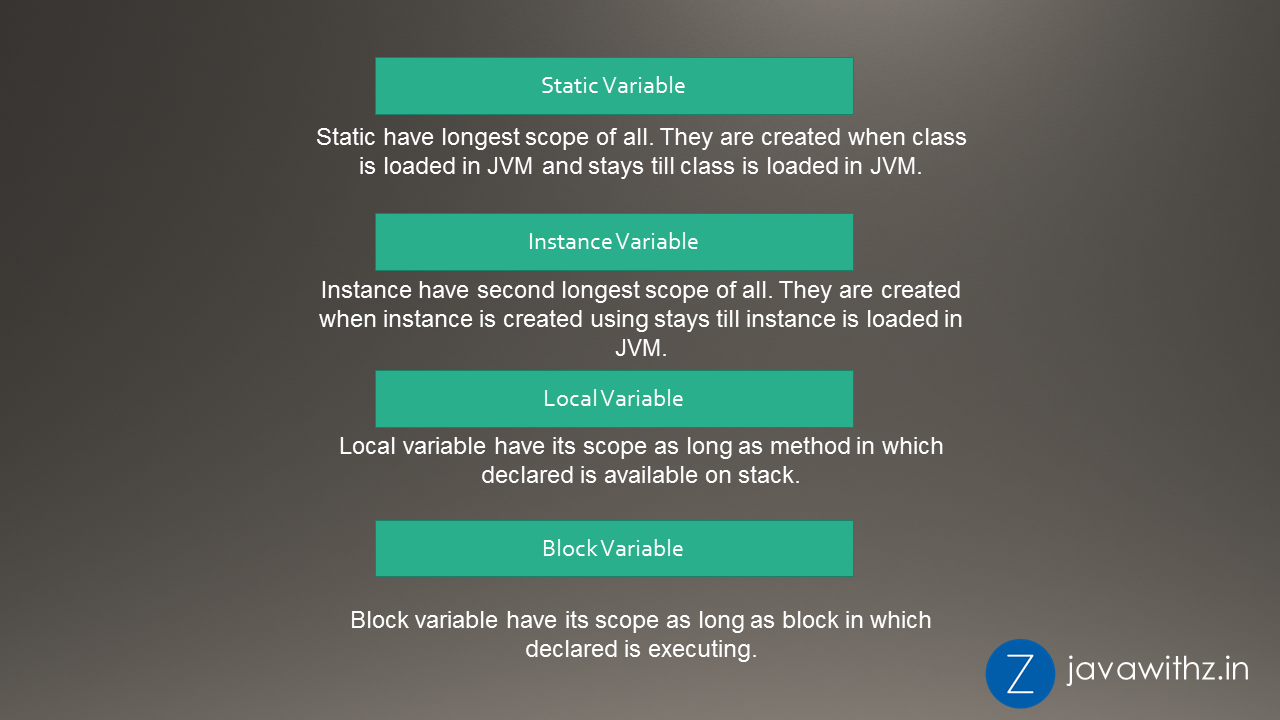
Now all the scopes have some specified living time.
Following is an image depicting the same.
| Scope of variable. |
1. Using instance variable in static area(majorly in main())
Let say for example we have a class Pen
class Pen
{
int inkLevel=100;
public static void main(String[] args)
{
inkLevel--;
}
}
Now inkLevel is a instance variable and will get loaded when the instance of the class will be loaded, but main() is a static method it get loaded when class is loaded in JVM and it always happens before instance loading. Hence inkLevel is not available for use when main() is loaded and hence it gives the following error.2. Attempting a local variable from a nested method.
Simple rule for local variable is that it will be only available in the method in which it is declared and at not other place.
Let see.
class MethodScope
{
public static void main(String[] args)
{
MethodScope s=new MethodScope();
s.m1();
}
public void m1()
{
int i=10;
m2();
}
public void m2()
{
i++;
}
}
Variable i is only available in method m1() so any attempt to use it outside will result in an error.3. Using block variable after block is executed.
Variable declared in for loop will be only available till the execution on loop. Not after that.
class BlockScope
{
public static void main(String[] args)
{
for (int i=0;i>10 ;i++ )
{
System.out.println(""+i);
}
i++;
}
}
Here variable i is block variable and is available only till loop is executing not after that.
Sending an HTML Mail using Java is as simple as sending a normal text mail as discussed in our previous blog post.
There are simple changes for sending HTML Mails.
public void setContent(Object o, String type)
This method is required to be called instead of setText(String text)
Let us check the following example.
Sending a text mail using Java
There are simple changes for sending HTML Mails.
public void setContent(Object o, String type)
This method is required to be called instead of setText(String text)
Let us check the following example.
import javax.mail.*;
import javax.mail.internet.*;
import java.util.*;
public class SendHTMLMail
{
String myEmail,myPassword;
SendHTMLMail()
{
String body ="<html><body><center>Welcome to Java with Z <hr />hello World
</center></body></html>";
myEmail = "youremail@gmail.com";
myPassword="yourpassword";
String host="smtp.gmail.com";
String port="465";
String recAdd="somene@gmail.com";
Properties prop = new Properties();
prop.put("mail.smtp.auth","true");
prop.put("mail.smtp.socketFactory.port",port);
prop.put("mail.smtp.starttls.enable","true");
prop.put("mail.smtp.socketFactory.class","javax.net.ssl.SSLSocketFactory");
prop.put("mail.smtp.socketFactory.fallback","false");
prop.put("mail.smtp.host",host);
SecurityManager manager=System.getSecurityManager();
try
{
Authenticator auth= new SMTPAuthenticator();
System.out.println("Authenticated");
Session session =Session.getDefaultInstance(prop,auth);
System.out.println("Session Acquired");
MimeMessage msg = new MimeMessage(session);
msg.setSubject("My HTML Mail");
msg.setContent(body,"text/html");
msg.setFrom(new InternetAddress(myEmail))
msg.setRecipient(Message.RecipientType.TO,new InternetAddress(recAdd));
System.out.println("Message ready ");
Transport.send(msg);
System.out.println("Mail Sent");
}
catch (Exception e)
{
e.printStackTrace();
}
}
public static void main(String[] args)
{
new SendHTMLMail();
}
private class SMTPAuthenticator extends Authenticator
{
public PasswordAuthentication getPasswordAuthentication()
{
return new PasswordAuthentication(myEmail,myPassword);
}
}
}
Java Mail API provides the collection of classes and interfaces which models sending of mail.
For working with Java Mail we require two jar files to be set in classpath or imported in some IDE.
mail.jar
and
activation.jar
You can download both the jar files from above provided links.
In case you are new to setting class path you can check out with the following video.
Java Mail API consists of some very important classes and interfaces.
We will cover at least those required for sending a mail.
All the classes and interfaces required to work with Java Mail API are in package
1. javax.mail
Classes here models the mail system.
2. javax.mail.internet
Classes here are specific to internet mailing systems,
-Session class represents the session acquired with the mail account.
For getting this session all the required properties as well as authentications have to be passed.
public static Session getDefaultInstance(Properties prop, Authenicator auth)
getDefaultInstance() is the static method used of session to acquire the session with the mail account.
It requires the Properties object filled as well as an Authenticator object.
Let us have a look how to fill up that Properties objet.
Properties props=new Properties();
SendMail.java
For working with Java Mail we require two jar files to be set in classpath or imported in some IDE.
mail.jar
and
activation.jar
You can download both the jar files from above provided links.
In case you are new to setting class path you can check out with the following video.
We will cover at least those required for sending a mail.
All the classes and interfaces required to work with Java Mail API are in package
1. javax.mail
Classes here models the mail system.
2. javax.mail.internet
Classes here are specific to internet mailing systems,
javax.mail.Session
-Session class represents the session acquired with the mail account.
For getting this session all the required properties as well as authentications have to be passed.
public static Session getDefaultInstance(Properties prop, Authenicator auth)
getDefaultInstance() is the static method used of session to acquire the session with the mail account.
It requires the Properties object filled as well as an Authenticator object.
Let us have a look how to fill up that Properties objet.
- props.put("mail.smtp.auth", "true");
- props.put("mail.smtp.socketFactory.port", "465");
- props.put("mail.smtp.host","smtp.gmail.com");
- props.put("mail.smtp.socketFactory.class", "javax.net.ssl.SSLSocketFactory");
- props.put("mail.smtp.socketFactory.fallback", "false");
mail.smtp.auth: Attempts to authenticate the user with AUTH command.
mail.smtp.socketFactory.port: Specifies the port to connect when using specified socket factory . If not set default port will be used which is 25.
mail.smtp.host: Determines the SMTP server where we need to connect to.
mail.smtp.socketFactory.class: If set, specifies the name of the class that implements the javax.net.SocketFactory interface.
mail.smtp.socketFactory.fallback: If set to true, failure to create a socket using the specified socket factory, will cause socket to be created using java.net.Socket class.
Once properties is created Authenticator object is required to be made.
Authenticator is an abstract class, it requires to be sub classed to be used.
Authenticator auth=new SMTPAuthenticator();
.
.
.
.
public class SMTPAuthenticator extends Authenticator
{
public PasswordAuthentication getPasswordAuthentication()
{
return new PasswordAuthentication(email,password);
}
}
Now let us see how session object is created.
Session session=Session.getDefaultInstance(props,auth);
Once session is acquired we need to create a MimeMessage to be sent.
javax.mail.internet.MimeMessage
- MimeMessage represents the Mime(MultiPurpose Internet Mailing Extension) style message.
Constructor
MimeMessage(Session session)
- Constructs an empty message to be sent on this session.
Important Methods
public void setSubject(String subject)
- Sets the subject for this message.
public void setFrom(Address address)
- Sets the address from where the message is originated.
public void setContent(Object o, String type)
- This is a convenience method for setting the content of the message. Type has to be specified for the message and it should be the one which is available to Java Mail Implementation.
Used when we need to send HTML Mails.
public void setContent(MultiPart multipart)
- Sends a message which is of multipart. Used to send mails with attachment.
public void addRecipient(Message.RecipientType type, Address address)
- Adds the recipient for this message.
Type of recipient can be
Message.RecipientType.TO
Message.RecipientType.CC-- Carbon Copy
Message.RecipientType.BCC-- Blind Carbon Copy
MimeMessage msg = new MimeMessage(session);
msg.setSubject("My first mail");
msg.setText("This is message body");
msg.setFrom(new InternetAddress("youremail@gmail.com"));
msg.addRecipient(Message.RecipientType.TO,new InternetAddress("someone@gmail.com"));
Once set we need to send the message using Transport object
javax.mail.Transport
- Abstract class that models message transport.
- Sub class provides actual implementation
public static void send(Message msg)
- Sends message.
Transport.send(msg);
Here is the full code to send a normal text mail;
Please change the email ids and passwords for its proper working.
SendMail.java
import javax.mail.*;
import javax.mail.internet.*;
import java.util.*;
public class SendMail
{
String myEmail,myPassword;
SendMail()
{
myEmail = "youremail@gmail.com";
myPassword="yourpassword";
String host="smtp.gmail.com";
String port="465";
String recAdd="someone@gmail.com";
Properties prop = new Properties();
prop.put("mail.smtp.auth","true");
prop.put("mail.smtp.socketFactory.port",port);
prop.put("mail.smtp.starttls.enable","true");
prop.put("mail.smtp.socketFactory.class","javax.net.ssl.SSLSocketFactory");
prop.put("mail.smtp.socketFactory.fallback","false");
prop.put("mail.smtp.host",host);
SecurityManager manager=System.getSecurityManager();
try
{
Authenticator auth= new SMTPAuthenticator();
System.out.println("Authenticated");
Session session =Session.getDefaultInstance(prop,auth);
System.out.println("Session Acquired");
MimeMessage msg = new MimeMessage(session);
msg.setSubject("My first mail");
msg.setFrom(new InternetAddress(myEmail));
msg.setText("This is message body");
msg.setRecipient(Message.RecipientType.TO,new InternetAddress(recAdd));
System.out.println("Message ready ");
Transport.send(msg);
System.out.println("Mail Sent");
}
catch (Exception e)
{
e.printStackTrace();
}
}
public static void main(String[] args)
{
new SendMail();
}
private class SMTPAuthenticator extends Authenticator
{
public PasswordAuthentication getPasswordAuthentication()
{
return new PasswordAuthentication(myEmail,myPassword);
}
}
}


